
A proper IPTV Reseller CRM Guide has to start with an uncomfortable point: most IPTV reseller panels already include basic customer management, so the real question isn’t whether you need one, it’s whether what you already have is good enough. Panels like the one behind britishreseller.shop let you create, renew, suspend and edit customer lines directly from the dashboard. That covers the mechanics of running accounts. It does not automatically cover the relationship side of the business, which is where a lot of resellers lose customers without noticing why.
Why Most Panels Already Include Basic Customer Management
Every credible reseller dashboard gives you some version of a customer list. You can usually see a username, a package, an expiry date and a status. For a reseller with fifteen or twenty customers, that view is often enough. You can scan it on a Sunday evening and know who needs a renewal reminder.
The problem shows up at scale. Once a reseller is managing eighty, two hundred or five hundred customer lines across different packages and possibly sub-resellers underneath them, a flat list stops being a management tool and becomes a wall of data. Nobody actually reads a five-hundred-row list looking for the twelve customers who are about to lapse. They need the system to surface that information without being asked.
That’s the actual gap a CRM approach fills. It isn’t about replacing the panel. It’s about layering a process on top of the panel’s raw data so the reseller acts on it instead of just storing it.
What This IPTV Reseller CRM Guide Assumes About Your Business
This guide assumes you’re already selling IPTV access through a panel and running into one of two situations: renewals slipping through the cracks, or a support history that lives entirely in your memory rather than anywhere written down. If neither of those applies yet, a spreadsheet is probably still the right tool, and you can stop reading the comparison section below and go straight to the tracking fields.
If either does apply, the choice isn’t really “CRM or no CRM.” It’s choosing between three genuinely different approaches, each with a different cost in time, money and reliability.
Pro tip: Before comparing tools, count how many active customer lines you’re currently managing. The right approach at forty customers is often wrong at four hundred, and vice versa.
Panel Tools, Spreadsheets or Dedicated Software: Comparing the Three Approaches
| Option | Best suited to | Limitation |
|---|---|---|
| Panel dashboard only | Small reseller bases, under roughly fifty active lines | No reminders, no notes field, no history of past issues |
| Spreadsheet layer | Growing bases, single operator, moderate sub-reseller activity | Manual updates, easy to fall behind, no automatic alerts |
| Dedicated CRM software | Multiple staff, large or fast-growing customer base | Ongoing subscription cost and setup time before it pays off |
None of these is objectively correct. A single-operator reseller with sixty customers who checks WhatsApp twice a day genuinely doesn’t need a paid CRM subscription. A team running several hundred lines across sub-resellers, on the other hand, will lose more money to missed renewals than they’d ever spend on proper software.
The middle option, a spreadsheet layer sitting on top of the panel, is where most UK resellers actually end up, and it’s worth taking seriously rather than treating it as a placeholder until “real” software arrives. A well-built spreadsheet with the right columns does most of what a basic CRM does, just without the reminders firing automatically.
The Data Points Worth Tracking For Every Customer
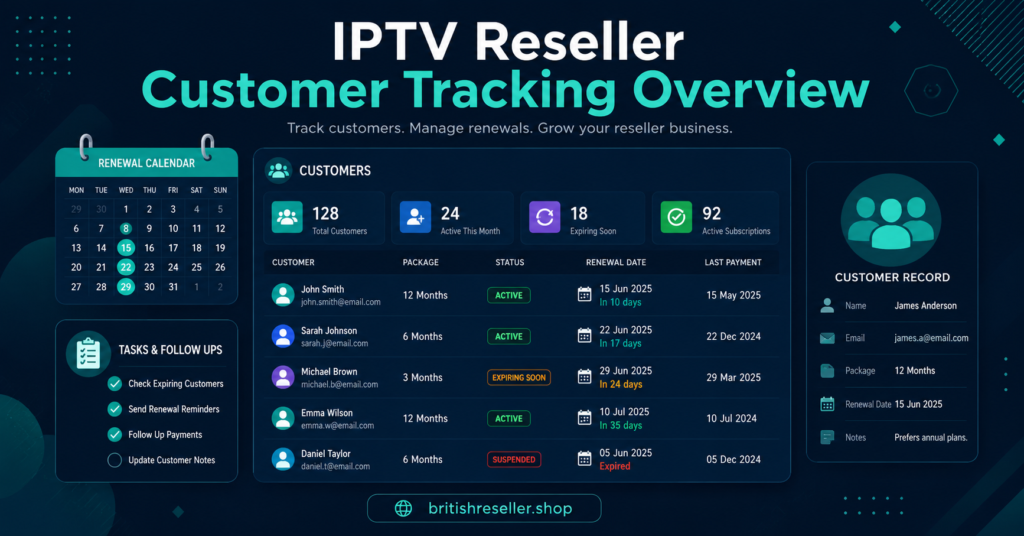
Whatever system you use, the fields matter more than the software. A customer record that only holds a username and an expiry date will always leave you guessing when something goes wrong. The fields that actually change how you operate are:
- Renewal date and package length, separate from the panel’s own expiry field, so you can plan reminders in advance rather than reacting on the day
- Device type and app used, because troubleshooting a Firestick customer is different from troubleshooting a smart TV app customer
- Payment method and last payment date, useful for spotting patterns before a dispute happens
- A running notes field for support issues, buffering complaints or anything the customer has previously reported
- Referral source, if you’re tracking which channels actually bring paying customers rather than one-off trial requests
- Sub-reseller ownership, if the line was created by someone underneath you rather than sold directly
None of this needs to be complicated. A single spreadsheet tab with these columns, updated whenever you touch a customer’s account, gives most resellers ninety percent of what a paid CRM offers.
Handling Renewals Before They Become Cancellations
Renewal management is where customer tracking actually earns its keep, because it’s the one area with a direct, measurable link to revenue. A customer who lapses because nobody reminded them isn’t a customer who decided to leave. They’re a customer you lost through a process gap.
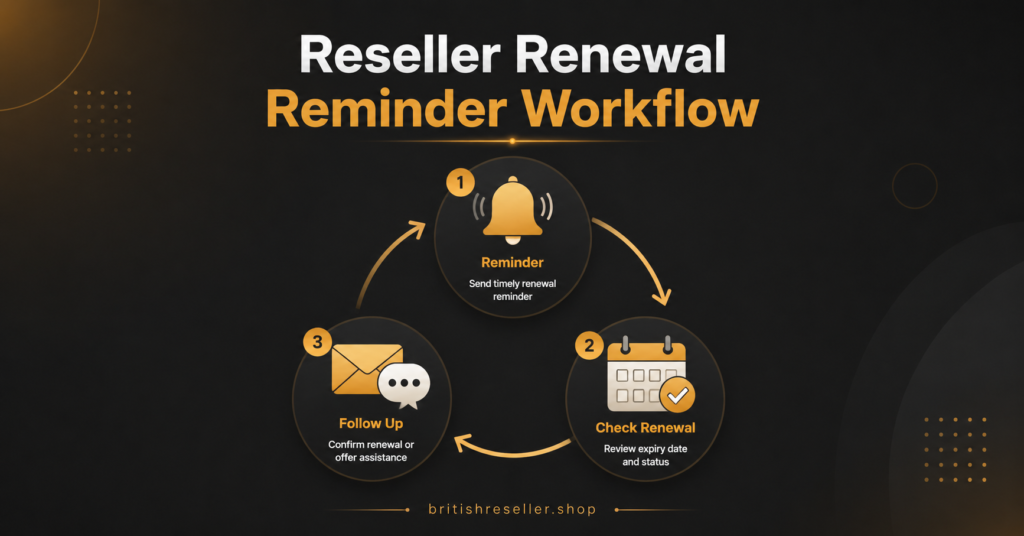
The workaround doesn’t need automation software. A weekly ritual, sorting your tracking sheet by renewal date and messaging anyone due within seven days, catches most of the problem on its own. IPTV Panel Resellers who add a second, gentler reminder at three days before expiry tend to see fewer last-minute cancellations, simply because the customer has time to act rather than discovering the service has already stopped.
Where this breaks down is scale. Past a certain customer count, a manual weekly sort stops being realistic for one person to do reliably alongside everything else the business needs. That’s usually the point where either a spreadsheet formula flagging upcoming renewals automatically, or a proper CRM with built-in alerts, starts to justify itself.
Sub-Reseller Records: A Different Tracking Problem
If you’re allocating credits to sub-reseller accounts, customer tracking splits into two layers rather than one. You need visibility into your own direct customers, and separately, enough oversight of each sub-reseller’s activity to know whether they’re managing their own customers properly.
This doesn’t mean seeing every one of a sub-reseller’s individual customer records. It means tracking credit balance, allocation history and any support escalations that came back to you because the sub-reseller couldn’t resolve them. A sub-reseller who keeps running out of credits mid-month, or whose customers keep escalating problems to you directly, is telling you something about how they’re operating, and a decent tracking sheet makes that pattern visible instead of anecdotal.
Pro tip: Keep sub-reseller credit history in its own tab or table, separate from direct customers. Mixing the two makes it much harder to see which side of the business is actually driving support load.
Signs Your Current System Is Costing You Customers
A few warning signs suggest your current approach, whatever it is, has stopped working:
- You’re finding out a customer lapsed only when they message asking why the service stopped
- Support notes exist only in your memory or scattered WhatsApp threads, so a second staff member can’t help a returning customer
- You genuinely don’t know how many sub-resellers are active versus dormant
- Renewal reminders happen only when you remember to check, not on a fixed schedule
- You can’t answer “how many customers churned last month” without manually counting
None of these require a five-figure software budget to fix. Most are solved by picking one system, however basic, and actually maintaining it consistently. The failure mode isn’t usually the tool. It’s inconsistency in updating whatever tool you’ve chosen.
If you’re still building your customer base rather than managing an existing one, it’s worth reading how resellers approach customer acquisition before investing time in tracking systems for customers you don’t have yet.
Choosing Between Panel Features Alone
Some panels go further than a basic customer list and include renewal alerts, notes fields or bulk messaging built in. If you’re evaluating panel options before committing to one, it’s worth checking what customer management tools are included rather than assuming you’ll need to build everything externally. A panel with decent built-in tracking can remove the need for a separate spreadsheet or CRM entirely, at least until the business grows past what any panel’s native tools are designed to handle.
Understanding how the underlying panel actually manages accounts also helps clarify which fields are already captured automatically, so you’re not duplicating data you can already pull from the dashboard itself.
Frequently Asked Questions
Does an IPTV reseller need dedicated CRM software to start?
No. Most resellers with fewer than fifty active customers manage perfectly well with the panel’s built-in customer list plus a simple spreadsheet for notes and renewal dates.
What’s the minimum information worth tracking for each customer?
Renewal date, device type, payment history and a running notes field cover most day-to-day decisions without needing a complicated system.
How often should renewal reminders go out?
A reminder around seven days before expiry, followed by a shorter one two or three days out, catches most lapses without feeling like spam to the customer.
Can I track sub-resellers in the same sheet as direct customers?
You can, but it usually causes confusion. Separate tabs or tables for sub-reseller credit activity make patterns easier to spot than mixing everything together.
When does a spreadsheet stop being enough?
Generally once manual updates start slipping, once more than one person needs to access customer history, or once the customer count makes a weekly manual review unrealistic.
Will a CRM guarantee fewer customer cancellations?
No system removes cancellations entirely. What consistent tracking does is stop cancellations caused by process failures, like a missed renewal reminder, rather than genuine customer decisions to leave.
Conclusion
The core message of this IPTV Panel Reseller CRM Guide is that the tool matters less than the consistency behind it. A panel’s built-in customer list, a disciplined spreadsheet or a paid CRM can all work, provided renewal dates, support notes and sub-reseller activity get updated every time something changes rather than only when there’s a problem. Start with whatever matches your current customer count, watch for the warning signs that your system is falling behind, and upgrade only when the manual approach genuinely can’t keep pace anymore.
Reseller CRM Setup Checklist
- Confirm what customer data your current panel already tracks before adding anything external
- Set up a single tracking sheet or system with renewal date, device, payment history and notes fields
- Separate sub-reseller credit tracking from direct customer records
- Schedule a fixed weekly time to review upcoming renewals
- Add a short second reminder two to three days before expiry
- Note recurring support issues per customer so problems aren’t diagnosed from scratch each time
- Reassess whether a spreadsheet is still enough once customer count or staff count grows